Here is the final version of my Music Video
Friday, 20 November 2009

Digi Pack Model
Here is a short video of my Digi Pack, showing what it would look like if made into a physical product after printing it out, CD and DVD included.
Magazine Advert Final

Thursday, 19 November 2009
Evaluation Task 1 - 9 Key Frames - 1. In what ways does your media product use, develop or challenge forms and conventions of real media products ?
My Music Video - 9 Frames

1 - This is an establishing shot that I have used because it shows the location in the video where the climax of it will end and I also really like how the light streams are used in the map for the video, it gives the shot a sense of mystery, an empty map with the light streaming in from the windows. I think that this is a good shot also because of the angle, it focuses up on the ceiling, but has framed the whole area that I was trying to show to the audience.
2 - Again this is another establishing shot where I have used the train tracks and the lighting from outside the tunnel to give the shot a sense of mystery, kind of like it heading out into the light from the darkness.
3 - This is the first shot of the character, showing him as he starts his journey towards the other character in the video. I have framed this from low down so that it adds emphasis to the character, making him look important in relation to his surroundings.
4 - This shot follows the character down the pathway, I think that this shot works well, using a constant speed to keep up with the character. I like the lighting in this shot, it is well lit, but has a dark and eerie sense to it.
5 - This, being the reverse of the previous frame, lets the character walk towards the camera, again at the same speed. I like this because it again shows the importance of the character in relation to his surroundings, keeping him framed centrally with the camera angled to make him look just as big as the train that he is next to, making him seem just as important as the train, a big metal powerful entity.
6 - I like this shot because it is a very simple and smooth shot flowing well with the music, as the music gets to a long and mellow tone I have used a simple tracking shot that curves around the action to imply that the camera follows the music as well as the action.
7 - This is a long shot that I have used, following the character along the side of the trains as he walks closer to his 'prey' I have also cut this shot so it jumps forward in time with the music, as there is a loud beat in the music I cut it. The one down side to this shot is that it is not very well lit, and some areas of it are too dark to make out where the character is in relation to his surroundings.
8 - I have used a top down shot here, as the character comes up the ladder, the camera also moves upwards, adding emphasis to the upwards motion, making the audience feel like they are going up the ladder with the character, instead of it just being a boring static shot and the character gets gradually closer to the camera.
9 - The last shot in the video, one that pans around the second character as the first stabs him from behind. I have framed it on one occasion so that the second character casts a silhouette in front of the window. I think that this works well because it has given a sense of mystery and unknown to the character, he's alone and no one will know instantly why he is there.
Overall, the shots and the scenes in my music video all work well together, I have made sure that I stick to the continuity rules to make the video make sense.
------------------------------------
Other Similar Music Videos - 9 Frames

Frames 1,3 and 6 of the 9 key frames here are from a music video that someone made as a parody for the song "Wonderful World". The joke being that it is a video about flesh eating zombies, and the song just gives the video a creepy sense to it. All of the camera shots in the video are very fluid and smooth, using Demo Smoother.
Frames 4,7 and 8 are from a video that Zacharia Scott made in 2005 for linkin park - session. In this video he has used many different editing techniques and camera movements to make it a very interesting video to watch, there are so many cuts and changes to the camera movement that it is a very quick video, and is very interesting over and over again.
Frames 2, 5 and 9 are from a camera movement test back in 2003, the director used the song 'Mad World' by Gary Jules to make the video fit, he has used very long and slow movement camera shots, a lot of the video is in slow motion, and he has added some very bland and contrasting colour correction on the video, which fits with the song.

1 - This is an establishing shot that I have used because it shows the location in the video where the climax of it will end and I also really like how the light streams are used in the map for the video, it gives the shot a sense of mystery, an empty map with the light streaming in from the windows. I think that this is a good shot also because of the angle, it focuses up on the ceiling, but has framed the whole area that I was trying to show to the audience.
2 - Again this is another establishing shot where I have used the train tracks and the lighting from outside the tunnel to give the shot a sense of mystery, kind of like it heading out into the light from the darkness.
3 - This is the first shot of the character, showing him as he starts his journey towards the other character in the video. I have framed this from low down so that it adds emphasis to the character, making him look important in relation to his surroundings.
4 - This shot follows the character down the pathway, I think that this shot works well, using a constant speed to keep up with the character. I like the lighting in this shot, it is well lit, but has a dark and eerie sense to it.
5 - This, being the reverse of the previous frame, lets the character walk towards the camera, again at the same speed. I like this because it again shows the importance of the character in relation to his surroundings, keeping him framed centrally with the camera angled to make him look just as big as the train that he is next to, making him seem just as important as the train, a big metal powerful entity.
6 - I like this shot because it is a very simple and smooth shot flowing well with the music, as the music gets to a long and mellow tone I have used a simple tracking shot that curves around the action to imply that the camera follows the music as well as the action.
7 - This is a long shot that I have used, following the character along the side of the trains as he walks closer to his 'prey' I have also cut this shot so it jumps forward in time with the music, as there is a loud beat in the music I cut it. The one down side to this shot is that it is not very well lit, and some areas of it are too dark to make out where the character is in relation to his surroundings.
8 - I have used a top down shot here, as the character comes up the ladder, the camera also moves upwards, adding emphasis to the upwards motion, making the audience feel like they are going up the ladder with the character, instead of it just being a boring static shot and the character gets gradually closer to the camera.
9 - The last shot in the video, one that pans around the second character as the first stabs him from behind. I have framed it on one occasion so that the second character casts a silhouette in front of the window. I think that this works well because it has given a sense of mystery and unknown to the character, he's alone and no one will know instantly why he is there.
Overall, the shots and the scenes in my music video all work well together, I have made sure that I stick to the continuity rules to make the video make sense.
------------------------------------
Other Similar Music Videos - 9 Frames

Frames 1,3 and 6 of the 9 key frames here are from a music video that someone made as a parody for the song "Wonderful World". The joke being that it is a video about flesh eating zombies, and the song just gives the video a creepy sense to it. All of the camera shots in the video are very fluid and smooth, using Demo Smoother.
Frames 4,7 and 8 are from a video that Zacharia Scott made in 2005 for linkin park - session. In this video he has used many different editing techniques and camera movements to make it a very interesting video to watch, there are so many cuts and changes to the camera movement that it is a very quick video, and is very interesting over and over again.
Frames 2, 5 and 9 are from a camera movement test back in 2003, the director used the song 'Mad World' by Gary Jules to make the video fit, he has used very long and slow movement camera shots, a lot of the video is in slow motion, and he has added some very bland and contrasting colour correction on the video, which fits with the song.
Evaluation Task 2 - Voice Over - 2. How effective is the combination of your main product and ancillary texts?
For evaluation task two I have dropped the volume of the music in my video down and recorded a voice over of me talking about the video and the image that I was trying to get across while making the video. Here it is :
Wednesday, 18 November 2009
Evaluation Task 3 - Feedback - 3. What have you learned from your audience feedback?
The first set of feedback that I received was when I first published my rough cut, from this I received feedback that was mostly positive, saying that people like the flow of the video and that it cuts well to the music. One thing that people did pick up on was that it needed to be more interesting, it was said a few times that maybe I should add some colour correction to the intro sequence, with the establishing shots. Here is a picture of what I came up with after putting my colour correction treatment on the video.

After version two of my rough cut, http://www.youtube.com/watch?v=R8SkEgtUHGI, I asked around the class for some more feedback, what people thought and any suggestions for improving it. On the whole people thought that again I had done well to cut the footage to the music, adding the jumps made it much more effective.


After talking to the artist about what he thought of the music video, he told me that he really liked it, he really liked the whole jump cutting. He suggested that maybe I add some effects to spice it up a little bit. Like some white flashes on top of the cuts.
Another thing that was said, mainly by the teachers, was a suggestion that I try to include some of the footage from my old video into the new one, adding some light effects to get it to be more interesting and to not have wasted all of my time before I started on the machinima video. Unfortunately when I did try to mix the two up, they were not going to work together and I would have just made it look worse. I think that maybe the light show was something that I really shouldn't have spent so much time doing, the footage was useless in the end, and I would not have been able to integrate it within the machinima video in any way.
After my final version, I posted a link up onto facebook to my blog and my video, and overall they all came back with some really positive feedback, telling me that the blog was easy to follow, a simple and effective design and it looked like all of the information that would have been needed was there. On the video all the feedback I got was positive, it wasn't very in depth feedback, but it was all positive. Below is a picture of the feedback that I received on facebook.

Monday, 16 November 2009
Evaluation Task 4 - Technologies - 4.How did you use new media technologies in the construction and research, planning and evaluation stages?
After Effects:
At the start of my project this was the main program that I was going to use, mostly using it for its ability to generate some very cool effects with minimal effort, and yet almost always have high standard results. In the end the only thing that I used After Effects for was to create the Ident for CDFilms (seen below). If I hadn't had access to this program I think that I would most likely have had to draw something on paper, and used a stop frame animation program to get the same or a similar effect that I was after.

Final Cut:
This is the program that I did all of my editing on, dropping all of my footage into the timeline, cutting it up, and also adding any effects that I wanted or needed to drop in. I think that without this program for editing, or any similar programs, such as Sony Vegas or AVID, I would have had to use something much more basic like Windows Movie maker, or iMovie.

Photoshop:

Photoshop:
Almost all of the still images that I have created throughout the project have been created or edited within Photoshop, it is a very versatile program which I can use to create any effect that I really want to. I think that without it I would have done most of my still images on paper by hand. This has really helped me generate images with much more ease and time saving methods.


Rapidshare is a website that allows me to upload files to the internet and give download links to anyone that I need to give access to my files. There are other websites much like this one (Ihud / filefront) but without any of them I would have had to send the files on a memory stick in the post, which would have been much more time consuming, and would have most likely meant that I would not have managed to get the video done in time.

Sound Click:
Sound click is a website that new and small time artists can publish their music and the world can log on to listen to it/download them. I used this website to download all of the songs from my artist, Austin. Without this I would have needed to get him to send me either a disc or a memory stick with the songs, posing the same problems as I mentioned before, time would be an issue and would also mean that I would probably not have been able to get the video done in in time.

Youtube:
I use youtube to upload all of my video's to the web, enabling the public and friends of mine to watch, rate and comment on my videos. For this project I used it to upload all of my versions of the music video. This enabled me to let others watch it whenever they wanted, without me having to send out DVDs again, with the time issue.


Search for facebook feedback
I have started my evaluation tasks by posting a link to my blog on facebook and asking my friends to give me some feedback so that I can use it in my evaluation.


Friday, 13 November 2009
Magazine Advert Feedback
Again I have asked for some feedback from the same peers as before, to see if they like the updates that I have made.
Alex : Much better, now that I know what I am going to get I am more likely to buy it. Although I would still like to know where I would go to buy it, instead of it just telling me that it is released and not telling me where I can get it.
Tara : Good now that there is a contents list and that the text its placed better on the page, it works well with each of the elements on the page. But I would maybe suggest moving the image of the digipack and the Contents list around, so that you get the digipack image first, after the text.
Tim : Better than the last version, now it has all the information that I would look for on a magazine advert.
Alex : Much better, now that I know what I am going to get I am more likely to buy it. Although I would still like to know where I would go to buy it, instead of it just telling me that it is released and not telling me where I can get it.
Tara : Good now that there is a contents list and that the text its placed better on the page, it works well with each of the elements on the page. But I would maybe suggest moving the image of the digipack and the Contents list around, so that you get the digipack image first, after the text.
Tim : Better than the last version, now it has all the information that I would look for on a magazine advert.
Revised Magazine Advert
Here is the revised version of my Magazine advert, updated everything that was needed and also changed what I said I was going to.

Here is the revised version of my Magazine advert, updated everything that was needed and also changed what I said I was going to.

Here is the revised version of my Magazine advert, updated everything that was needed and also changed what I said I was going to.
Magazine Advert Plans
After the feedback, I can clearly see that I need to add some more information onto the advert, I am going to move the picture of the digipack up so I can put some fine print underneath it and also I am going to put a contents list on it somewhere. I may also change the text slightly, re-scale it or change the positioning.
Magazine Advert Draft Feedback
I asked a few peers for feedback on my draft of my magazine advert and this is what they said:
Alex: I think that it needs some information on what is in the digipack, also add some fine print to make it look real, other than that it is a good clean and simple design that works well.
Tara: It has a nice clean design that is simple and eye catching, I would like some more information on what is in the package, I can't really see it clearly on the picture of the digipack, other than that it is good.
Tim: Nice simple design, but does need information on what I will be getting when I buy it.
Alex: I think that it needs some information on what is in the digipack, also add some fine print to make it look real, other than that it is a good clean and simple design that works well.
Tara: It has a nice clean design that is simple and eye catching, I would like some more information on what is in the package, I can't really see it clearly on the picture of the digipack, other than that it is good.
Tim: Nice simple design, but does need information on what I will be getting when I buy it.
Magazine Advert Draft 1
Here is the first draft of my magazine advert, I am going to get some feedback then create a revised version.


Thursday, 12 November 2009
Magazine Advert Research
As my final task for the music video project I am going to create a magazine advert for my Digipack / music video, below are a few examples of adverts for similar products and a little analysis for each.

This one for 'ust Fabulous, is a very simple advert, it shows the product and the name of the product and that's it, using the aesthetics of the product to draw people into it. I think that the product does have a very unique style and eye catching ability, meaning that no other information is needed on the page, if you like the aesthetics of the product then you are likely to buy it for that reason, or look up what it is before buying it. The advert itself is very clearly digitally created, meaning that it is no an actual picture of the product, but it works very well to show what it is trying to sell.

This advert for 'MotorHead's new album is a very different style of advert, it shows the audience both the product, in this case an album, aswell as a band member or figure head for the band. It, unlike the previous ad, has a lot of information on it, things like what's in the package that you buy, the band name, and fine print at the bottom, presumably showing the release date and rrp and relative information.

This advert for REM's albm, is different entirely to both of the above adverts, using a very lucid visual style to entice the audience into looking at the advert, it is advertising an already released album and so does not need to show a release date. The text that is covering the majority of the page is presumably the song names that are on the album, this would be done to show the audience that if they like one song in particular from the band that they could find it in the list and get their favourite song, aswell as others by the band that they might like.

This AC/DC advert is the first that does not actually show the product in question, instead it uses an amplifier to advertise the album, perhaps the album will be released with a picture of an amplifier on the front. It also advertises what is on each of the three discs that you get when you buy it, two CD's and one DVD. One technique that has been used here is the use of the word "Unleashed" instead of "released", this would entice the audience into believing that the album is 'wild' or 'un-tame'.

Again with this advert for the Foo Fighters the product that is being sold is not clearly shown, instead it uses a very noticeable style, using metal plating with the band logo on it to advertise the product. I think that this works really well in that it is a big and simple advert that is eye catching and would make you stop and look at it, once you are interested in what you have seen you can then read down and get all of the information you were looking for as to what is going to be on the disc and when it is released.
This one for 'ust Fabulous, is a very simple advert, it shows the product and the name of the product and that's it, using the aesthetics of the product to draw people into it. I think that the product does have a very unique style and eye catching ability, meaning that no other information is needed on the page, if you like the aesthetics of the product then you are likely to buy it for that reason, or look up what it is before buying it. The advert itself is very clearly digitally created, meaning that it is no an actual picture of the product, but it works very well to show what it is trying to sell.
This advert for 'MotorHead's new album is a very different style of advert, it shows the audience both the product, in this case an album, aswell as a band member or figure head for the band. It, unlike the previous ad, has a lot of information on it, things like what's in the package that you buy, the band name, and fine print at the bottom, presumably showing the release date and rrp and relative information.
This advert for REM's albm, is different entirely to both of the above adverts, using a very lucid visual style to entice the audience into looking at the advert, it is advertising an already released album and so does not need to show a release date. The text that is covering the majority of the page is presumably the song names that are on the album, this would be done to show the audience that if they like one song in particular from the band that they could find it in the list and get their favourite song, aswell as others by the band that they might like.
This AC/DC advert is the first that does not actually show the product in question, instead it uses an amplifier to advertise the album, perhaps the album will be released with a picture of an amplifier on the front. It also advertises what is on each of the three discs that you get when you buy it, two CD's and one DVD. One technique that has been used here is the use of the word "Unleashed" instead of "released", this would entice the audience into believing that the album is 'wild' or 'un-tame'.
Again with this advert for the Foo Fighters the product that is being sold is not clearly shown, instead it uses a very noticeable style, using metal plating with the band logo on it to advertise the product. I think that this works really well in that it is a big and simple advert that is eye catching and would make you stop and look at it, once you are interested in what you have seen you can then read down and get all of the information you were looking for as to what is going to be on the disc and when it is released.
Digipack Contents
Here is a breif summary of what my Digipack would include.
Songs:
Sea Water - Feature Song
Dear Darling
Tree Magician
Crash Breaker
Flaming June
Videos:
Sea Water Music Video
Sea Water Music Video - Making of
Dear Darling Music Video - Bonus Track
Interview with Austin Killey
Booklet:
Interview with Austin Killey (textual version of the video)
Images from the music video production process
A story on Austin Killey + how he made the songs
Songs:
Sea Water - Feature Song
Dear Darling
Tree Magician
Crash Breaker
Flaming June
Videos:
Sea Water Music Video
Sea Water Music Video - Making of
Dear Darling Music Video - Bonus Track
Interview with Austin Killey
Booklet:
Interview with Austin Killey (textual version of the video)
Images from the music video production process
A story on Austin Killey + how he made the songs
Tuesday, 10 November 2009
Digipack
Here is the final version of my Digipack, in the style of a template that I would then be able to print off and fold into the physical product.


Monday, 9 November 2009
Rough Cut Two
Here is the second cut to my music video, this time with extra footage and a Slug where I will put more establishing shots once I have rendered them in game and put them onto a hard drive to bring into Coleridge and edit.
CD Cover Designs


Here are a couple of CD Covers from the industry, I am using these as reference points to use when creating my own one for my digipack. In all of them you can see that the artist isn't seen in the image, the images are very stylized and would stand out in a selection.

Friday, 6 November 2009
Plan on updating my Covers after feedback
After the feedback that I have recieved from peers in the classroom, I am going to try and spice up the front cover a little bit, I am going to add some effects to the picture, making it stylised in one corner and making the style fade out as it gets towards the other corner.
I am also going to use a similar style for the rest of the digipack, I like the design, and through my feedback I am confident that it is a safe bet to go with.
I am also going to use a similar style for the rest of the digipack, I like the design, and through my feedback I am confident that it is a safe bet to go with.
Front and Rear Covers Feedback
Alex: The front cover seems a little too plain, maybe add some more interesting items into the canvas, also add an album name. The rear cover though is really well done, good positioning of the text and the Barcode makes it look authentic
Matt: Good use of the contrasting lights between the two frames, using the light of the outside on the front cover, and the darkness of inside on the rear. The use of different fonts works well and is not to over done, also a good use of different colours in the text that correlate with the background.
Matt: Good use of the contrasting lights between the two frames, using the light of the outside on the front cover, and the darkness of inside on the rear. The use of different fonts works well and is not to over done, also a good use of different colours in the text that correlate with the background.
Digipack Front and Back Covers V1
Here is a first draft for my Front and Rear covers of my digipack:

DigiPack Template
I have done a little research into the digipack template shapes, and have come across this website that has some template designs for Digi Packs and CD Covers, I am going to use the 6 Panel Digipack Design, two disc.
Here is a copy of the template:

Here is a copy of the template:

Wednesday, 4 November 2009
Digi Pack Research
A 'digipack' that is now a common item in the music industry, consists of a larger casing than an average Album, meaning that it can contain sometimes a booklet and a Dvd along with the Album Cd, mostly they have been made as paper or card fold outs that have 3 spaces to hold all of the contents. Like this one for Oasis

Whereas this one, for Tenacious D's album has got the CD along with 'The Pic of Destiny' and some tarot Cards. And a booklet that would probably have come with the Album.

Whereas this one, for Tenacious D's album has got the CD along with 'The Pic of Destiny' and some tarot Cards. And a booklet that would probably have come with the Album.
Monday, 2 November 2009
Rough Cut Version One
Today at coleridge I started editing the footage that I have into a rough cut, I started with the only establishing shots that I managed to get rendered and then use the videos of one of the characters walking around.
I played around with some colour correction to give it more depth, add some contrast to the scene. I think that it worked out really well, except for one shot that was poorly lit and so I just made it darker. Overall I am quite happy with the edit so far, I think that where I have cut chunks out and made it jump forward in time to the beat of the music that it works really nicely.
I played around with some colour correction to give it more depth, add some contrast to the scene. I think that it worked out really well, except for one shot that was poorly lit and so I just made it darker. Overall I am quite happy with the edit so far, I think that where I have cut chunks out and made it jump forward in time to the beat of the music that it works really nicely.
Sunday, 1 November 2009
Demo Smoothing
Demo smoothing is part of the Machininma process that Source Machinima artists use to create much more professional standard Camera Work, Commonly used when the player cannot get high enough on the map, or the director wants a birds eye view, or just some really smooth camera work.
I will use this technique for almost all of my video, some of the shots that I will get of locations and establishing shots I have used myself in a simple straight walking pattern, leaving me able to have smooth camera work, and not have to worry about it being too fast or too slow.
Here are some pictures of others using the Demo smoothing tool in Source Machinima.

In this second picture, you can see both the yellow and white lines, this is the original camera work, where the person walked whilst recording the Demo, the green and purple lines are the smoothed track, this is where the camera man / director of Photography for the shoot has gone through the footage and moved the camera around so that it is
a) Smoother
b) framing the shot right
and c) not intercepting the actors or any props.
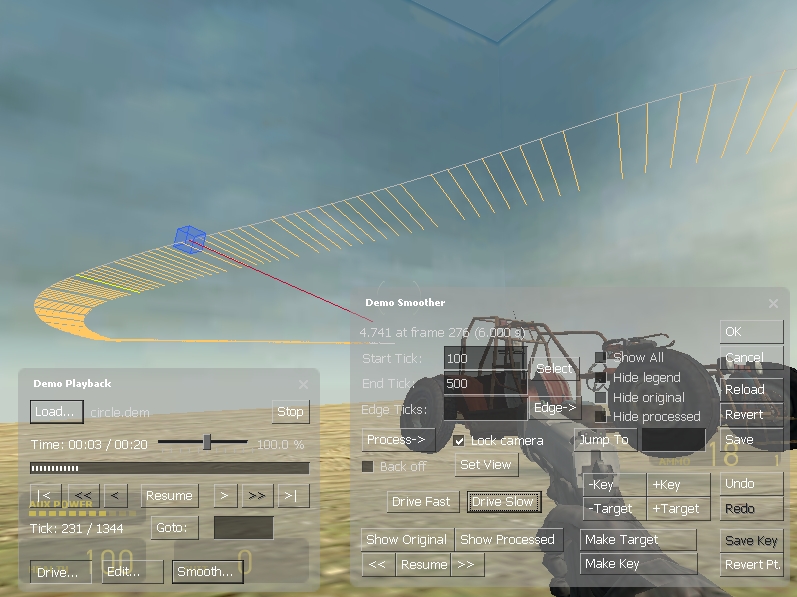
I will use this technique for almost all of my video, some of the shots that I will get of locations and establishing shots I have used myself in a simple straight walking pattern, leaving me able to have smooth camera work, and not have to worry about it being too fast or too slow.
Here are some pictures of others using the Demo smoothing tool in Source Machinima.
In this second picture, you can see both the yellow and white lines, this is the original camera work, where the person walked whilst recording the Demo, the green and purple lines are the smoothed track, this is where the camera man / director of Photography for the shoot has gone through the footage and moved the camera around so that it is
a) Smoother
b) framing the shot right
and c) not intercepting the actors or any props.
Shooting Session Two
Now I have completed the clips from Garrys Mod, I have just loaded up Counter Strike Source and with two friends I have recorded some footage of them running around and killing each other, this was good fun, but it did have its difficulties. And now I have 7 or 8 .dem files that I need to sort through, demo smooth them and also render them to video format.
Problem number one
I have spent the last hour or so trying to find out which codec to use when rendering the footage from GarrysMod out to an avi or similar file type, this is caused by my computer being slow and not wanting to render anything into a file type that I can view in real time.
Luckily now I have figured out which codec to use when rendering it, and I should get all the clips done in about the next hour or so with any luck.
Luckily now I have figured out which codec to use when rendering it, and I should get all the clips done in about the next hour or so with any luck.
Shooting Session One
I have finished filming all of the footage that I need from GarrysMod ( A half life 2 modification ) all of this footage are things where I have taken the time to get some static and tracking shots, opening the scene up for the rest of the video.
Here are a few pictures that I have taken of around the map which I will be using for my video.


Here are a few pictures that I have taken of around the map which I will be using for my video.


Inspiration for the Machinima Video
This is not a music video, but is a machinima piece created in Half life 2 and Half life 2 deathmatch, using human players to act out what they wanted them to.
I like this video because it has allot of depth to it, it shows good use and understanding of camera work and the ability that they have in half life 2 with the camera.
I also very much like the use of the music to set the scene. I will be using the music in mine to cut the videos together and pace the video as a whole.
A Change of Plans
Throughout the last week or so, I have had a long think about my music video, and with the deadline approaching rapidly I have come to the conclusion that it is a bad idea for me to hope that I can get this whole Light show done in time, the time that it takes to complete one sequence as well as the render time, coupled with the fact that when I do have them all done, trying to fit them together in such a way that it looks good and I wanted to achieve from the beginning.
Instead of doing this, I am now going to work on a video that is Machinima based, using the game Counter Strike source to create a video within which I have allot more freedom as to what I want to do with it. And I can control every aspect of what I am trying to do, every prop, every set of lighting, everything that can be changed I can change with full control and no worries about getting permissions from people that own the land.
Instead of doing this, I am now going to work on a video that is Machinima based, using the game Counter Strike source to create a video within which I have allot more freedom as to what I want to do with it. And I can control every aspect of what I am trying to do, every prop, every set of lighting, everything that can be changed I can change with full control and no worries about getting permissions from people that own the land.
Monday, 19 October 2009
Filming at the Junction
On thursday last week we all went down to the junction to shoot our footage for the music video. This was a really good opportunity to use the space that we had, and they had also set up the green and blue screens really well, using some specialist lighting to get everything lit properly so we were all able to get our footage shot well.
After waiting around for James and Alex to finnish their filming, I was able to get both Kirk and Lawrence to move around to the music, and complete different actions for me so that I would be able to use them in my music video, I will in the end use the footage to add effects like light streaks to wrap them around the actor that I am using, I will also create an effect where Kirk is trowing a ball of light to himself, as well as one effect where light particles erupt from his hands.
Here are two pictures of kirk from the shoot.


After waiting around for James and Alex to finnish their filming, I was able to get both Kirk and Lawrence to move around to the music, and complete different actions for me so that I would be able to use them in my music video, I will in the end use the footage to add effects like light streaks to wrap them around the actor that I am using, I will also create an effect where Kirk is trowing a ball of light to himself, as well as one effect where light particles erupt from his hands.
Here are two pictures of kirk from the shoot.
Production Process Images

Me playing around in after effects trying my hardest to get the expressions to work and do what I wanted them to.

Here is just a shot of the footage that I was playing around with in the earlier image rendering. It was taking a very long time, and I gave up and tried rendering it in a lower resolution as it was just an attempt at rendering it so I could see how it had turned out as trying to RAM Preview it in after effects would have taken too long.
Tuesday, 13 October 2009
Model Release Form

Here is a copy of my Model Release form, I will hand this out to my actor to sign so I have permission to use them and release their image in my music video.
Friday, 9 October 2009
Similar effects in other music videos 2
Here is the music video for the song 'New Divide' by 'Linkin Park'.
Some of the effects that have been used to create this music video, I really like the look of, and perhaps they would work with my music video. I am not sure that trying to re-create these effects in the time that I have left would not be a wise idea, as I am not entirely sure how to generate them, nor do I know if I have the software readily available. Trying to create these effects would include trying to find a tutorial or similar that will teach me how to do it, mastering it, then applying it to my own footage. This could take a long time to learn and as it is not a simple effect I would think that it would take a long time to complete.
The one effect that I will try to generate briefly, should I manage to get it done in a decent amount of time and to a reasonable standard, I may end up using it in my video, is the effect where the singer is generated out of lights, hollow, but with his 'outer shell' made of small led-like lights.
I think that the way this video is cut together is actually very good, I think that the transitions are well timed and using a style like this with my video would be a good idea.
Some of the effects that have been used to create this music video, I really like the look of, and perhaps they would work with my music video. I am not sure that trying to re-create these effects in the time that I have left would not be a wise idea, as I am not entirely sure how to generate them, nor do I know if I have the software readily available. Trying to create these effects would include trying to find a tutorial or similar that will teach me how to do it, mastering it, then applying it to my own footage. This could take a long time to learn and as it is not a simple effect I would think that it would take a long time to complete.
The one effect that I will try to generate briefly, should I manage to get it done in a decent amount of time and to a reasonable standard, I may end up using it in my video, is the effect where the singer is generated out of lights, hollow, but with his 'outer shell' made of small led-like lights.
I think that the way this video is cut together is actually very good, I think that the transitions are well timed and using a style like this with my video would be a good idea.
Wednesday, 7 October 2009
Ed Lovelace Talk
Today in the first period of the day we had a talk and a showing of some of his work from Ed Lovelace, an ex student at Long road who went on to Bournmouth University to study film.
During the talk we watched a few of his videos from his carreer at Pulse Films, which him and one of his friends from University set up. We saw two music videos that he did for the band 'Cage the Elephant', I personally really liked how both of these were done, with very unique style to them and some very good angles with the camera. I really liked the music video for the song 'In one Ear' (Video below)
I really like the set that had been built for this video, the style of the camera work and the editing also. I like the very sudden jolt of the camera that was used when certain beats in the song were played, this is an effect that I want to have the oppotunity to be able to re-create in some of my own work.
The other two music videos that we saw of his were also very good, using shoestring budgets to create something simple and yet extremely effective. Using only £100 to create a music video for smaller bands and being able to have the oppotunity to make that music video. On one occasion he was asked to make a video in a two hour window at approximately 2am before the band went on tour. He managed to plan the video for about a week in advance, and shot the whole video in a way that made it look like it was done in one shot, using breakers in the scene to hide the cuts that were made, such as walls that could be repeated and stitched together to look seemless.
He talked about his time at university, and that when he was there he managed to make allot of new friends that all shared a similar interest. Ed mentioned that when you get out into the media industry like he has, most of the work is freelance, and that if you are on your own when doing it; that sometimes it can get a bit lonely, so teaming up with a partner or a group of friends from university was a good idea, being able to stay in a team that are all interested in the work and are committed to getting it all done.
Something else that he talked about was being a runner for a media company, he had a work placement in his second year at Bournmouth, being a runner for 6 weeks, he says that this is not a good carreer starter, because all that you seem to end up doing is making cups of tea for staff members.
He has started work on a feature film called 'Warewolves across america', based on a homeless folk artist that goes around and plays shows in peoples' front rooms, the artist actually ran away from home at 14 or 15 and has been playing gigs around america for 17 years. Ed went around america with him for 2 months, filming lots of footage of him playing shows in peoples front rooms. The film is based half on a documentary of the artist and half on fiction. It will be shown across small cinemas in america and london, doing the film festival circuit before trying to work its way into the bigger streams.
Ed hopes to be able to get into the feature film industry in the near future, he talked about how he has been influenced by Michel Gondry's film 'Eternal Sunshine of the Spotless Mind', and how he wanted to reference the film in some of his music videos, but because it is such a conceptual film and that allot of people want to do the same and being able to get the permission is now very hard.
Overall I think that Ed Lovelace is a pretty cool character, having the oppotunity to work on the music videos that he has seems like a really good opportunity in any media carreer, I think that he has done very well, and I personally like almost all of his work. I would like to have the chance to work on music videos like the ones that he has worked on in the future.
Monday, 5 October 2009
Inspiration 2
Here is an advert for a new Citroen Car. In this advert the editor has used a technique that I want to use in my music video, where the actor in the ad has sparks or particles coming out of his hand, I want to use an effect like this, but instead of using a constant stream of particles, I will use the beat of the music to generate a burst of particles on the beat.
Unfortunately I have not been able to find the video of this advert somewhere that allows me to post it here.
Here is another advert that I like, with some similar effects.
I also really like the way that the light trails have been used in this video to create the shape of the car. Outlining it, and making it seem transparent. I would like to be able to use this effect to generate the outline of the artist or actor in the video. Although I am cautious that this might be a little too time consuming and may end up trying to find a simpler alternative that has a similar effect but with much less effort and time consumption.
Unfortunately I have not been able to find the video of this advert somewhere that allows me to post it here.
Here is another advert that I like, with some similar effects.
Sunday, 4 October 2009
Similar Effects in another music video #1
Here is one music video that I have found that uses light effects similar to the ones I want to use.
Holly Vallance - Kiss Kiss
In this video I like how the lights have followed the singers body parts well, using motion tracking presumably the editor has managed to keep the lights almost attachted to her body, hiding certain areas, and making sure that nothing explicit is seen. I also like the lights that are scattered around, as if they were being used to create the set, maybe this effect has been done by using strobe lights placed around the set, turning them on and making it seem like a 3 dimensional space within the video.
Holly Vallance - Kiss Kiss
In this video I like how the lights have followed the singers body parts well, using motion tracking presumably the editor has managed to keep the lights almost attachted to her body, hiding certain areas, and making sure that nothing explicit is seen. I also like the lights that are scattered around, as if they were being used to create the set, maybe this effect has been done by using strobe lights placed around the set, turning them on and making it seem like a 3 dimensional space within the video.
Inspiration #1
This is the advert from the second generation ipod Nano. It has the light trails that I am interested in using for my music video, I first saw this when it was still being shown on TV, it instantly interested me, I wanted to know how they managed to come up with such an effect, and have hoped since that I would be able to get the chance to use that effect in a video of my own.
I like how the video is really quickly cut, how it moves very quickly from shot to shot, not just simple cuts, but making it seem as if the two shots were interlinked, or on the same stage by moving one out of eyeshot one way, while moving the other in from the other side, but doing it quickly enough to make it seem like a very quick cut.
Wednesday, 30 September 2009
Pitch Feedback
The feedback that I received from both Pete and the class today at Coleridge was mostly positive feedback, saying that my idea was good, and could turn out well if I can pull it off in the allotted time frame.
The main thing that was mentioned was whether I would be able to get everything done in time, making sure that I leave myself enough time to get all the effects created and making sure that they all fit with my initial idea and the music.
One thing that I have thought about and was mentioned in the discussion was that I could use live footage of a sole singer singing the only line in the song, I would use an actor that I know, or get the artist to record some footage of himself. I would then use that and fit it into the music in a way that fits around the other effects, Making sure that I was not going over the top and keeping the footage in keeping with the rest of the video.
Tuesday, 29 September 2009
Pitch
Artist : Austin Killey
Song : Sea Water
Genre/Style : Upbeat / Electronic / Orchestral / Rock
Initial Idea : Trippy light show
Expansion : A Light show, using inspiration from the original ipod Nano Advert (http://www.youtube.com/watch?v=N0SLJkA1A8w) to create an aura of mystery, following the beat of the music to direct the light trails that I will create in After Effects with a plugin called 'Trapcode - Particular'. I will use the colour patlette of Greens and Blues.
Artist's Comments : He likes the idea, thinks it would go great with the music. He suggested the colour patlette as he did create the song with the same frequencies as the colours blue and green.
Final Idea : The same as the above, I will use allot of fast paced cuts, cutting to almost every beat, maybe creating a sense of narrative within the light show, creating several different sequences, but cutting between them, from one to another then to another and back to the start again, so you see all of them progress over time.
Techniques : Most of the work will be done in after effects, using plugins and other techniques to create all of my lights and other effects. I will most likely be using Final cut to edit the final thing, seeings as it is much easier to use when cutting video, I will be able to create a much quicker paced music video.
Other Ideas : I am toying with the idea of asking the artist to get some footage of himself saying the only line that is repeated throughout the song 'got to get it on board'. Adding it to the video at the appropriate moments, or maybe shooting some live footage of a stage or something where I can integrate the lights into the scene adding them to 3d space.
Song : Sea Water
Genre/Style : Upbeat / Electronic / Orchestral / Rock
Initial Idea : Trippy light show
Expansion : A Light show, using inspiration from the original ipod Nano Advert (http://www.youtube.com/watch?v=N0SLJkA1A8w) to create an aura of mystery, following the beat of the music to direct the light trails that I will create in After Effects with a plugin called 'Trapcode - Particular'. I will use the colour patlette of Greens and Blues.
Artist's Comments : He likes the idea, thinks it would go great with the music. He suggested the colour patlette as he did create the song with the same frequencies as the colours blue and green.
Final Idea : The same as the above, I will use allot of fast paced cuts, cutting to almost every beat, maybe creating a sense of narrative within the light show, creating several different sequences, but cutting between them, from one to another then to another and back to the start again, so you see all of them progress over time.
Techniques : Most of the work will be done in after effects, using plugins and other techniques to create all of my lights and other effects. I will most likely be using Final cut to edit the final thing, seeings as it is much easier to use when cutting video, I will be able to create a much quicker paced music video.
Other Ideas : I am toying with the idea of asking the artist to get some footage of himself saying the only line that is repeated throughout the song 'got to get it on board'. Adding it to the video at the appropriate moments, or maybe shooting some live footage of a stage or something where I can integrate the lights into the scene adding them to 3d space.
Monday, 28 September 2009
After Effects test, music beats
Here is a short test that I did showing that I can create effects where the on screen elements follow the beat of the music. Here I have a box that grows and shrinks in accordance to the beat, along with a counter that translates the beat into numbers, the louder the beat, the higher the numbers, and respectively lower.
Thursday, 24 September 2009
Austin Killey and his ideas
Here is what my artist gave me as his ideas for his music video that he has asked to be made with ideas and peferences to what he would like done, after deciding that I am going to use his song 'Sea Water'.
Hey David,
"Seawater" has a lot going on in the song, and so I'm hoping to see some strobe lights and other flashes in the video. It's sort of like flicking a lighter in the dark: you only see the flash of sparks for a split second until you flick it again. I also picked Seawater for the name due to a lot of visions of sea green and light blue hues flashing in my mind as I composed this. The frequencies of the song even match the color frequencies too, as they're just colder colors past 3kHz. I hope my comments give you a good start.
Thanks,
Austin Killey
Hey David,
"Seawater" has a lot going on in the song, and so I'm hoping to see some strobe lights and other flashes in the video. It's sort of like flicking a lighter in the dark: you only see the flash of sparks for a split second until you flick it again. I also picked Seawater for the name due to a lot of visions of sea green and light blue hues flashing in my mind as I composed this. The frequencies of the song even match the color frequencies too, as they're just colder colors past 3kHz. I hope my comments give you a good start.
Thanks,
Austin Killey
Nickelback - Someday Music Video Analysis
This analysis of Someday by NickelBack was written by both Me and Alie Faulkner.
The music video to Someday by NickelBack is good because while it does have the traditional footage of the band playing in a stage area, it also includes a narrative which can be seen as a literal translation of the lryics. The narrative that is shown as a separate video to the band, is not immediately understandable as to what is going on, it could be seen as a simple break up, but somethings do not quite fit as to a break up, such as the shot at about 55 Seconds in where the male character walks through the milk and doesn't leave any footprints. Perhaps not immediately noticeable as fitting with the lyrics, or what seems to be going on with the narrative. Another shot that has been used that would be seen as perhaps a break up scene, but also perhaps slightly weird is that when the female character gets into the car and the male character is outside the car bashing on the windows trying to stop her from leaving, but she doesn't seem to notice that he is there, and also doesn't make any attempt at responding to him.
The scenes where the band are playing the song, they are in the foreground with the background slightly blurred out, perhaps to add emphasis to the band members. Another thing that is generic, and not really noticeable to the audience, is that the band are actually playing to the person/people watching the video, looking directly into the camera. In the scenes that the band are performing for the camera, it's is quite casual. The band are all dressed in typical 'casual' clothes, such as jeans and t-shirts, none of them are dressed up and look as though they may do on a normal day, not a music video. Another part of the scene that makes it look casual is the setting, the setting is just a room with the band and their instruments, unlike some conventional music videos, the band are not in a live performance or on a stage.
There are many scenes in this music video that involve special effects, these special effects are used to show that the characters in the narrative part of the music video are dead. These are things such as when the woman in the narrative steps in the puddle of milk she then leaves milk foot prints on the floor as she walks, where as when the man steps in the puddle of milk, he does not leave any foot prints, as if he hadn't even stepped in the milk. Another piece of special effects is when the woman is in the car accident and walks out of the car as a ghost, as she walks through the crowd, she has a glowing aurora around her.
The music video to Someday by NickelBack is good because while it does have the traditional footage of the band playing in a stage area, it also includes a narrative which can be seen as a literal translation of the lryics. The narrative that is shown as a separate video to the band, is not immediately understandable as to what is going on, it could be seen as a simple break up, but somethings do not quite fit as to a break up, such as the shot at about 55 Seconds in where the male character walks through the milk and doesn't leave any footprints. Perhaps not immediately noticeable as fitting with the lyrics, or what seems to be going on with the narrative. Another shot that has been used that would be seen as perhaps a break up scene, but also perhaps slightly weird is that when the female character gets into the car and the male character is outside the car bashing on the windows trying to stop her from leaving, but she doesn't seem to notice that he is there, and also doesn't make any attempt at responding to him.
The scenes where the band are playing the song, they are in the foreground with the background slightly blurred out, perhaps to add emphasis to the band members. Another thing that is generic, and not really noticeable to the audience, is that the band are actually playing to the person/people watching the video, looking directly into the camera. In the scenes that the band are performing for the camera, it's is quite casual. The band are all dressed in typical 'casual' clothes, such as jeans and t-shirts, none of them are dressed up and look as though they may do on a normal day, not a music video. Another part of the scene that makes it look casual is the setting, the setting is just a room with the band and their instruments, unlike some conventional music videos, the band are not in a live performance or on a stage.
There are many scenes in this music video that involve special effects, these special effects are used to show that the characters in the narrative part of the music video are dead. These are things such as when the woman in the narrative steps in the puddle of milk she then leaves milk foot prints on the floor as she walks, where as when the man steps in the puddle of milk, he does not leave any foot prints, as if he hadn't even stepped in the milk. Another piece of special effects is when the woman is in the car accident and walks out of the car as a ghost, as she walks through the crowd, she has a glowing aurora around her.
Music Choices
I think that I am definately going to use one of the track by an artist called 'Austin Killey' also well known as DJShox.
Allot of his work can be found here: www.soundclick.com/djshox
I think that I would like to use his track called 'Flaming June' although this is an 8 minute track and I maybe a little optimistic about being able to create a video for a track that long in the space provided.
The other main choice that I had in mind was his track named 'Sea Water' which is a very upbeat track, with minimal lyrics, but has a very distinct style and some very cool melodies in it.
The only other track that I was considering was 'Dear Darling' which is a much more slow and 'easy listening' track that he has created. I like this track because it is very well paced and has allot of harmony to it.
Allot of his work can be found here: www.soundclick.com/djshox
I think that I would like to use his track called 'Flaming June' although this is an 8 minute track and I maybe a little optimistic about being able to create a video for a track that long in the space provided.
The other main choice that I had in mind was his track named 'Sea Water' which is a very upbeat track, with minimal lyrics, but has a very distinct style and some very cool melodies in it.
The only other track that I was considering was 'Dear Darling' which is a much more slow and 'easy listening' track that he has created. I like this track because it is very well paced and has allot of harmony to it.
Wednesday, 23 September 2009
Production Update
So far this is a short list of the things that I have done for my music video:
- Come up with the initial idea
- Done some research into the sorts of music that might work with my idea
- Found some music
- Contacted the Artist and gotten permission to use his music
- Had a listen to some tracks and thought about which track to use
- Looked at some videos on youtube for inspiration
- Had a go at trying to create an effect on After Effects
- Looked at some videos on youtube for inspiration
- Had a go at trying to create an effect on After Effects
Monday, 7 September 2009
Initial Ideas
For my project I was thinking about perhaps doing something that uses no real time footage atall, instead using Visual Art style and doing a light show that will keep in time with the music and the beat of the music.
Perhaps something like the Visualizer from iTunes, which uses the beat of the music to generate a sequence of ribbons and lights that are indeed mesmerizing. Below you can see an image that I have pulled from iTunes whilst playing a song and having the visualizer turned on.

Here you can see that the visualization from iTunes is very intricate, showing many different styles and effects all linking in together and acting upon the beat of the music.
There are many different visual effects that have been used for windows media player in the past here are two that are quite well known:

this one is one of the original visualizers, used in windows 2000 media player.

here is a lightly more up-to-date version of the famous 'equaliser' bars effect, used in windows media player 6 (approx 2005)
Here are another few visual styles that can be recognised as Windows Media player visualizations.
The Sound wave:

Alternating Blocks:

Waterfall:

Of all of the above, I might try to use a mixture of all of them, and maybe some others, maybe even invent my own styles, I think that the best one and the one that will be easily recognisable as it flowing with the music would be the sound wave one, which I think I might be able to create in After effects with some work.
Perhaps something like the Visualizer from iTunes, which uses the beat of the music to generate a sequence of ribbons and lights that are indeed mesmerizing. Below you can see an image that I have pulled from iTunes whilst playing a song and having the visualizer turned on.

Here you can see that the visualization from iTunes is very intricate, showing many different styles and effects all linking in together and acting upon the beat of the music.
There are many different visual effects that have been used for windows media player in the past here are two that are quite well known:

this one is one of the original visualizers, used in windows 2000 media player.

here is a lightly more up-to-date version of the famous 'equaliser' bars effect, used in windows media player 6 (approx 2005)
Here are another few visual styles that can be recognised as Windows Media player visualizations.
The Sound wave:
Alternating Blocks:
Waterfall:
Of all of the above, I might try to use a mixture of all of them, and maybe some others, maybe even invent my own styles, I think that the best one and the one that will be easily recognisable as it flowing with the music would be the sound wave one, which I think I might be able to create in After effects with some work.
Subscribe to:
Comments (Atom)